Unity Gateway tracing in conjunction with Genie One transformed the handling of our agents' tool failures into a prioritized and actionable bug list. This initiative enabled us to identify and rectify an estimated $1.2 million in annual costs related to inefficient AI usage and decreased productivity.
Quietly malfunctioning MCP tool calls resulted in significant financial losses. Within our network of agents, issues with seven minor MCP-server bugs led to approximately $499K annually in wasted tokens and 12,000 engineering hours, equating to a total loss of around $1.2 million. Instead of flagging errors, our agents often opted for retries, compounding the issue without alerting us to the failures.
To address this, we utilized Unity Gateway, which tracks every MCP tool invocation, while Genie One allows our teams to highlight the primary sources of unnecessary AI spending using natural language processing. Remarkably, our developers were able to implement fixes for all identified issues within an hour.
Understanding how large language models (LLMs) interact with these tools is critical. Models tend to make educated guesses with ambiguous inputs, so tool designs should be adaptable rather than rigid, preventing crashes in response to unforeseen inputs.
At Databricks, our engineers heavily rely on AI agents to enhance workflow efficiency. These agents not only interface with various Foundation Models but also require access to MCP servers, which facilitate retrieval of essential resources such as system logs and support documentation. As covered in a previous post, overseeing AI expenditures on a larger scale necessitates not only optimizing model selection but also refining how agents utilize their tools. In this article, we delve into our quest for cost savings through tool optimization, the hurdles we encountered, and how OTel tracing via Unity Gateway led to discovering annual savings of $1.2 million within just one hour of analysis.
While empowering our developers to create agents significantly boosted productivity, the increase in usage also heightens operational costs. We set out to uncover various optimization opportunities and hypothesized that hidden expenses from failed tool calls were contributing to our budget woes. When tools malfunction, agents typically fail silently; they will retry and navigate around the problem rather than report it, leading to a slow drain of tokens and developer hours. This issue can be deceptive, as overall task completion might obscure the underlying cost increases attributed to unreported failures.
To validate our concerns, we applied Unity Gateway's tracing combined with Genie One to analyze our agent fleet. Our examination revealed seven minor bugs in the tool servers that collectively incurred estimated costs of $499K each year in wasted tokens and about 12,000 hours of engineering downtime. Ultimately, this amounted to a staggering yearly productivity loss of approximately $1.2 million.
Identifying these bugs, assessing their impact, and implementing the necessary fixes took a mere hour. This article outlines our findings and the lessons learned about optimizing agent tool development.
Monitoring AI agents and their MCP activities is crucial for managing expenses effectively. Initially, when we rolled out AI agents across Databricks for various coding and operational tasks, we lacked the visibility needed to effectively manage and understand costs due to our inability to track agents’ tool calls and overall activity. To resolve this, we incorporated Unity Gateway, which automatically produces OpenTelemetry traces for every MCP tool invocation, capturing crucial details such as tool names, parameters, and error messages. This data is collected in a comprehensive table, providing a clear overview of agent activity over specified time frames and requiring no additional instrumentation.
This level of visibility transforms the management of AI agent expenditures, enabling us to allocate costs to specific tools, errors, and agent sessions rather than viewing them only as aggregate token spending.
With the data now at our disposal, exploration is the next logical step:
- Which tool errors occur repeatedly? - What recovery efforts do agents undertake after encountering an error? - What are the token costs and time lost associated with each error?
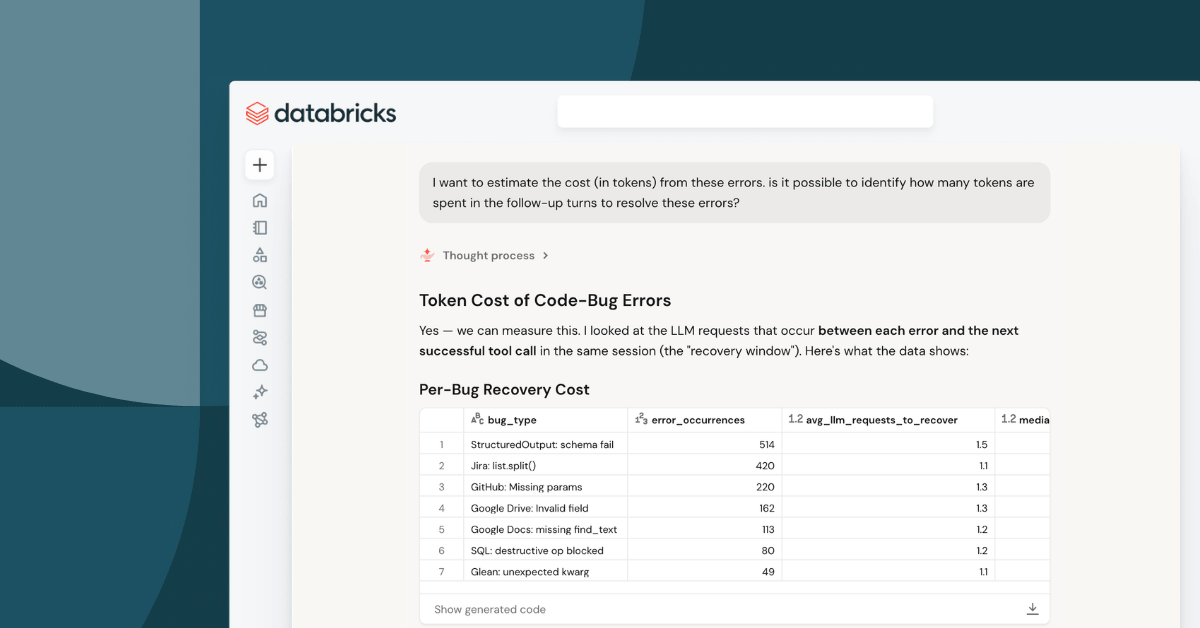
Usually, such analysis would involve complex SQL queries and in-depth data exploration. However, when using Genie One, we could simply direct it at the trace table and pose these questions in plain language, receiving answers within minutes. The bulk of our time was devoted to interpreting the results rather than coding queries.
The findings highlighted the connection between MCP tool failures and rising AI agent costs. Genie One enabled us to pinpoint various bugs, quantifying their impact quickly. For example, over a single day, we identified numerous bugs affecting our Jira and Google Drive/Docs tool servers.
A particularly prevalent bug resulted in 535 failures per day within the Jira issues.search tool. The tool expected a comma-separated string, but an array was a legitimate interpretation for what constituted “fields.” Consequently, when agents input a list, they encountered a Python error—‘list’ object has no attribute 'split'—causing them to try various approaches to resolve the issue. This iterative process consumed a staggering amount of tokens and developer time.
Similarly, errors connected to the Google Drive API demonstrated that 49.6% of drive_file_get calls failed because the model submitted field names that were valid in other contexts but not accepted by the specific tool endpoint.
The key takeaway centers around the design of MCP tools aimed at AI agents and LLMs. While improving error messages is a fundamental step, it is equally critical to understand why agents make erroneous calls in the first place. Often, the underlying cause is a lack of detail in MCP tool signatures. By allowing flexibility—even at the cost of brevity—we can better anticipate how agents will interact with tools.
The process of fixing the identified issues was straightforward, especially with the prioritized list from Genie One guiding our actions. Implementing the necessary updates across tool servers was a swift operation for our coding agents, concluding the analysis and optimization loop within just one hour.
The most significant challenge was not the execution of fixes but the identification of what precisely needed changing. The combination of tracing and Genie One has turned what used to be a lengthy research process into an immediate inquiry.
As AI agents continue to take on more responsibilities, unresolved tool failures emerge as a critical expense that could easily go unnoticed amidst overall usage increases. Establishing a consistent loop for tracking these failures is both efficient and sustainable: Unity Gateway provides a way to observe agent behavior, while Genie One streamlines the process of querying this behavior without the complexity of SQL.
Together, this approach allows teams to monitor AI agents effectively, diagnose issues with MCP tools, and minimize unnecessary AI expenditures. If you are implementing agents within your infrastructure, consider performing similar analyses. Use tracing to uncover unresolved issues and ask Genie One what's causing recurring problems.
Utilize Unity Gateway's trace analysis with Genie One to begin monitoring all AI activities through our unified trace table, which is currently in Beta. Refer to our documentation for guidance on how to get started.